--------------------------------------------------------------------------------------------------------------
The most important thing about Machine Learning is understanding why we do Machine Learning. In my view, ML means letting a rigid machine learn the patterns of something and give you the answer you want.
Of course, most ML work is done in Python, so future sharing will basically be teaching based on Python.
First, the most important first step in ML is obtaining data.
For beginners, I suggest using the Website Google Colab for development. Google Colab provides free computing power and saves developers from the very annoying action of pip install (or pip3 install). This is also why new developers are advised to start in Colab. Here is the Google Colab link:https://colab.research.google.com/
There are generally several ways to obtain data: one is to directly obtain Datasets in formats such as csv and json, whose main advantage is that they are easy to start with. The second is to obtain it through an API, which will be explained later. The third is to directly extract data from online sites, such as image tables that exist as png or jpeg files. I will not say more about this here.
Those are roughly the ways to obtain data. So how do we build a bridge between Colab and the data?
This brings us to the most basic numpy in ML and DS.
numpy is a very useful library. Its calculation speed is far beyond native python, and it is mostly used for multidimensional matrix operations.
The method for loading the library is as follows:
import numpy as np
You can write these library-loading lines separately in a code cell in Google Colab, which is more convenient.
Run this cell. When you immediately see it run successfully, that means the library has been loaded successfully.
Since numpy is mainly used for matrix operations, we need to talk about the numpy array.
We can create a native python list, for example:
list = [1,2,4,6,4,5]
Convert it to a numpy array:
L = numpy.array(list)
With that, a numpy array has been created.
Like the properties of a list, you can use an index to get the corresponding value in an array, for example:
        [1, 2, 3, 4, 5, 6, 7]

index:   0  1  2  3  4  5  6
         ^
         |
         |
x =  L [ 0 ]
At this point, it should not be hard to see that x was assigned the value at position 0 in the array, which is 1. At this time, x is no different from the ordinary python number 1 and has the same properties.
The one-dimensional array described earlier was the simplest case. What about two dimensions?
x1 = [1,2,3,4,5]
     [2,3,4,5,6]
     [3,4,5,6,7]
Convert it into a numpy array:
list = numpy.array(x1)Now you have learned how to create a numpy array. Next come array operations.
Operations on a numpy array follow the matrix rules of linear algebra, as shown below:
Addition and subtraction:
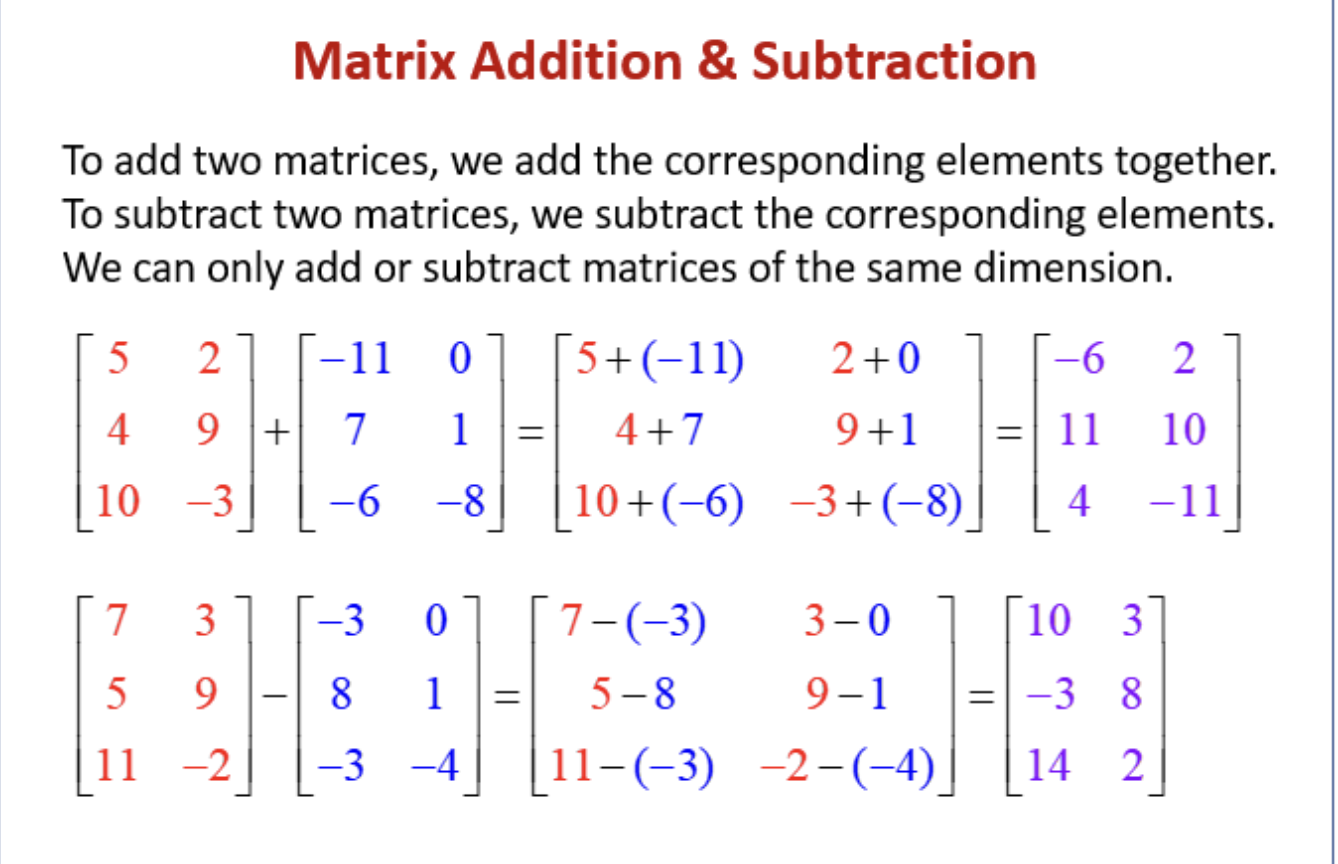
Code implementation:
import numpy as np
x1 = [1,2,3]
x2 = [2,5,7]

list1 = np.array(x1)
list2 = np.array(x2)

list_addition = list1 + list2
# Another method:
list_add = np.add(list1, list2)

# Subtraction is the same: replace "+" with "-", and replace ".add" with ".subtract"
Next is calculation across the whole array. For convenience, I will not go into the exact principle; the method is shown below:
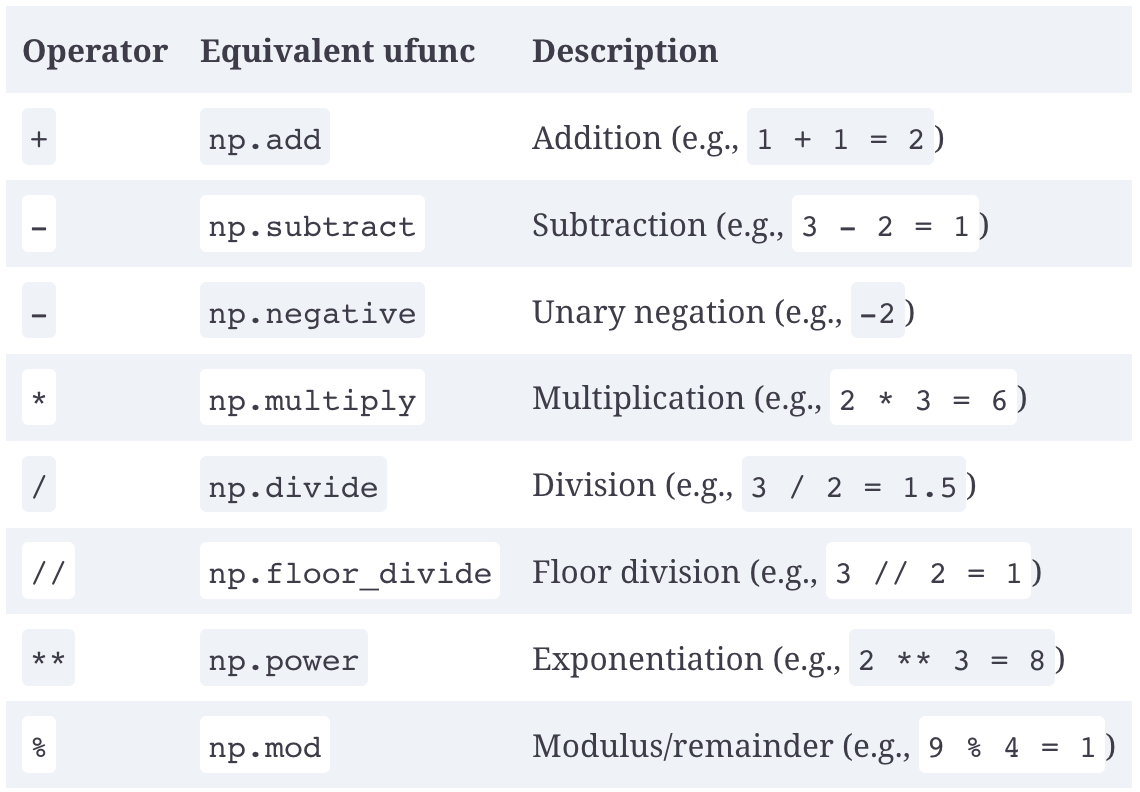
Code implementation (because of space limits, I will not implement every one and will only implement some common ones):
Here we use numpy's array-generation method to take a shortcut and create an array.
import numpy as np

x = np.arange(4)

# x -> [1,2,3,4]

print("x      =", x)
print("x + 5  =", x + 5)
print("x - 5  =", x - 5)
print("x * 2  =", x * 2)
print("x / 2  =", x / 2)
print("x // 2 =", x // 2)
All right, by this point you have learned most of the uses of the numpy array. This episode ends here.
Next time, I will share basic dataset importing and cleaning, as well as basic Pandas methods. See you next time! Bye-bye~